
Automated UI tests don't usually fail because a test suddenly forgets what it is supposed to do.
They fail because the application changed.
A developer changes an element ID. A CSS class gets renamed. A component is rebuilt. A DOM hierarchy changes. A dynamically generated attribute gets a different value.
The application still works.
The user can still click the same button.
Element not found.
This is the broken locator problem.
Locators are fundamental to UI test automation. Selenium, Playwright and other browser automation frameworks all need a way to identify the elements a test needs to interact with.
The challenge is that modern web applications change constantly.
So building reliable UI automation isn't simply about finding an element once. It is about continuing to identify the right element as the application evolves.
Make element identification more resilient so locators are less likely to break.
Automatically recover when a locator does break.
The second approach is generally referred to as locator healing or self-healing test automation.
What is a locator in test automation?
A locator is a mechanism used by an automation framework to identify an element on a web page.
ID
Name
Class
CSS selector
XPath
Text
Label
Role
Test attributes
DOM relationships
For example, Selenium might identify a button using:
By.id("submit")

  By.cssSelector("[data-testid='submit']")

  By.xpath("//button[text()='Submit']")
Modern tools such as Playwright also provide user-facing locator strategies such as roles, labels and text.
The underlying purpose is the same: tell the automation framework which element the test intends to interact with.
Why do locators break?
The problem begins when the locator depends on something that wasn't actually part of the test's intent.
Consider:
<button id="submit-123">Submit</button>
A test might use:
#submit-123
A developer later changes the implementation:
<button id="submit-456">Submit</button>
Nothing meaningful changed from the user's perspective. There is still a Submit button. But the locator is now invalid.
Dynamic IDs
CSS class changes
DOM restructuring
Component replacement
New elements
Application redesigns
These are all examples of UI change without necessarily being functional change.
The first line of defense: choose better locators
Locator healing shouldn't be the first solution to every locator problem.
The first step is to create reliable locators.
Good locator strategy is one of the foundations of maintainable test automation.
A locator should ideally depend on characteristics that are stable, meaningful, unique, related to the element's purpose, and unlikely to change as part of ordinary UI implementation work.
For example, a dedicated test attribute such as:
<button data-testid="submit-button">Submit</button>
can be preferable to a generated ID.
Similarly, a semantic locator such as a role and accessible name can express the intent of the test more clearly than a long DOM path.
Selenium's official guidance recommends unique, predictable IDs when available and concise CSS selectors when they are not; it also notes that XPath is flexible but can be more complicated to debug.
CSS selectors vs XPath
One of the most common discussions in UI automation is: CSS selector or XPath?
There isn't a universal answer.
CSS selectors
CSS selectors are often concise and effective for IDs, classes, attributes and straightforward relationships.
[data-testid="submit-button"]

  button.submit
XPath
XPath becomes useful when the relationship between elements matters, particularly when you need to navigate through the DOM or express relationships that are difficult to represent with CSS.
//label[text()='Email']/following::input[1]
The important principle isn't that CSS is always better than XPath. It is: use the simplest locator that uniquely identifies the intended element and does not unnecessarily depend on volatile implementation details.
What makes a locator reliable?
Prefer stable attributes
Attributes specifically intended for automation can be useful, such as data-testid or data-qa.
Prefer meaningful identifiers
A stable business or semantic identifier is generally better than a generated value.
Avoid generated IDs
Values that change between builds, sessions or renders create unnecessary locator maintenance.
Avoid unnecessary DOM depth
Long selectors encode many assumptions about the current implementation.
Avoid positional selectors where possible
button:nth-child(3) can break simply because another button is added.
Use semantic information where available
Roles, labels and accessible names can provide a more meaningful description of the element.
These practices can significantly reduce locator maintenance. But they don't eliminate the problem.
Even good locators can break
Imagine you followed all the recommended practices and created a stable test attribute.
[data-testid="submit-button"]
The test is stable for months. Then the development team replaces the component and removes the test attribute. Or the application moves to a new component library. Or the entire form is redesigned.
The element still exists. The test's locator doesn't.
A good locator reduces the probability of failure. It cannot guarantee that the locator will never become invalid.
What is locator healing?
Locator healing is the ability of an automation system to recover when the original locator can no longer identify the intended element.
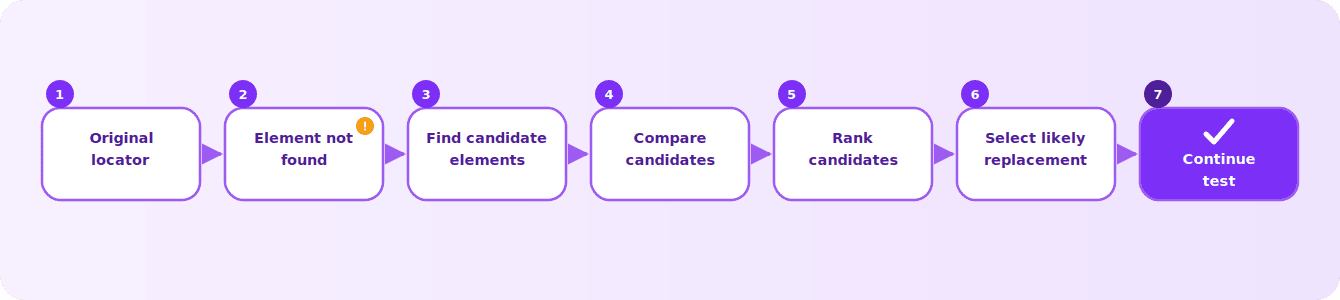
The key word is intended. The objective isn't simply to find another element. It is to find the element that represents the same interaction the test originally intended.
How does locator healing work?
Tag
Text
Attributes
DOM structure
Parent
Children
Neighboring elements
Relative position
Context
Other identifying characteristics
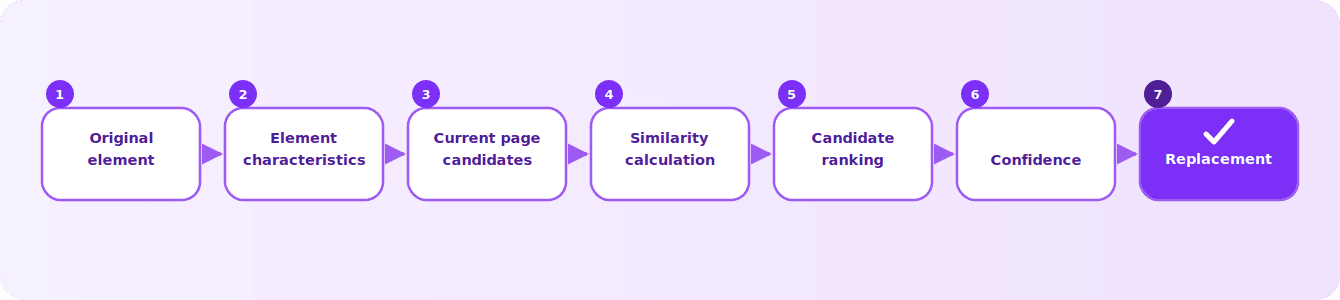
This makes locator healing fundamentally an element matching problem.
Locator healing is not the same as making every test pass
A healed test that executes the wrong element can be more dangerous than a failed test.
Suppose the original test intended to click Delete Customer. The UI changes and the healer identifies Edit Customer. The test successfully clicks the element and may report PASS, but it did not perform the intended action.
This is a false heal.
Candidate similarity
Confidence
Ambiguity
Competing candidates
Magnitude of UI change
Whether the replacement is sufficiently trustworthy
Sometimes the correct decision is: I don't know. Fail and ask for human intervention.
The goal isn't to make every failed test pass. The goal is to recover the intended interaction when there is sufficient evidence that the replacement is correct.
Does locator healing require AI?
No.
Locator healing can be implemented using algorithmic approaches such as DOM similarity, attribute matching, structural comparison, robust locator generation and candidate ranking.
AI can be one approach, but it isn't a prerequisite for locator healing. Current self-healing approaches span rule-based fallback, multi-attribute matching, machine learning, semantic reasoning and visual or contextual matching.
The interesting engineering question isn't: Can AI heal a locator? It is: What is the most reliable way to identify the intended element after the UI changes?
Locator healing vs self-healing test automation
Locator healing
Focuses specifically on recovering an element when its locator breaks.
Self-healing test automation
Can refer to a broader capability where automated tests adapt to application changes.
Locator healing is therefore one important part of self-healing automation.
Not every automated test failure is caused by a broken locator. Tests can also fail because of application defects, synchronization problems, test data, environment issues, changed business logic or incorrect assertions.
Why dynamic elements are particularly challenging
Modern web applications are highly dynamic. Elements can be created, destroyed or modified as the user interacts with the application.
IDs may change.
Elements may appear later.
Elements may be replaced during rendering.
The same component may exist in different states.
Lists may change size or order.
Not every element-not-found failure is a locator-healing problem. Sometimes the locator is correct and the test simply attempted the interaction before the element was ready.
The evolution of locator resilience
1. Basic selectors
ID, CSS, XPath and class. The test identifies an element using implementation details.
2. Better locator strategies
Stable attributes, semantic locators, accessible roles and meaningful relationships. The test becomes less dependent on volatile implementation details.
3. Locator healing
The system recovers when the original locator no longer works.
4. Contextual and visual identification
The next question is more fundamental: do we always need to represent an element as a CSS selector or XPath in the first place?
A tester naturally thinks: Click the Submit button in the Payment section. They don't naturally think in terms of a deeply nested DOM path.
That creates an opportunity for richer ways of identifying elements using their observable characteristics, context and relationships.
Prevention and cure
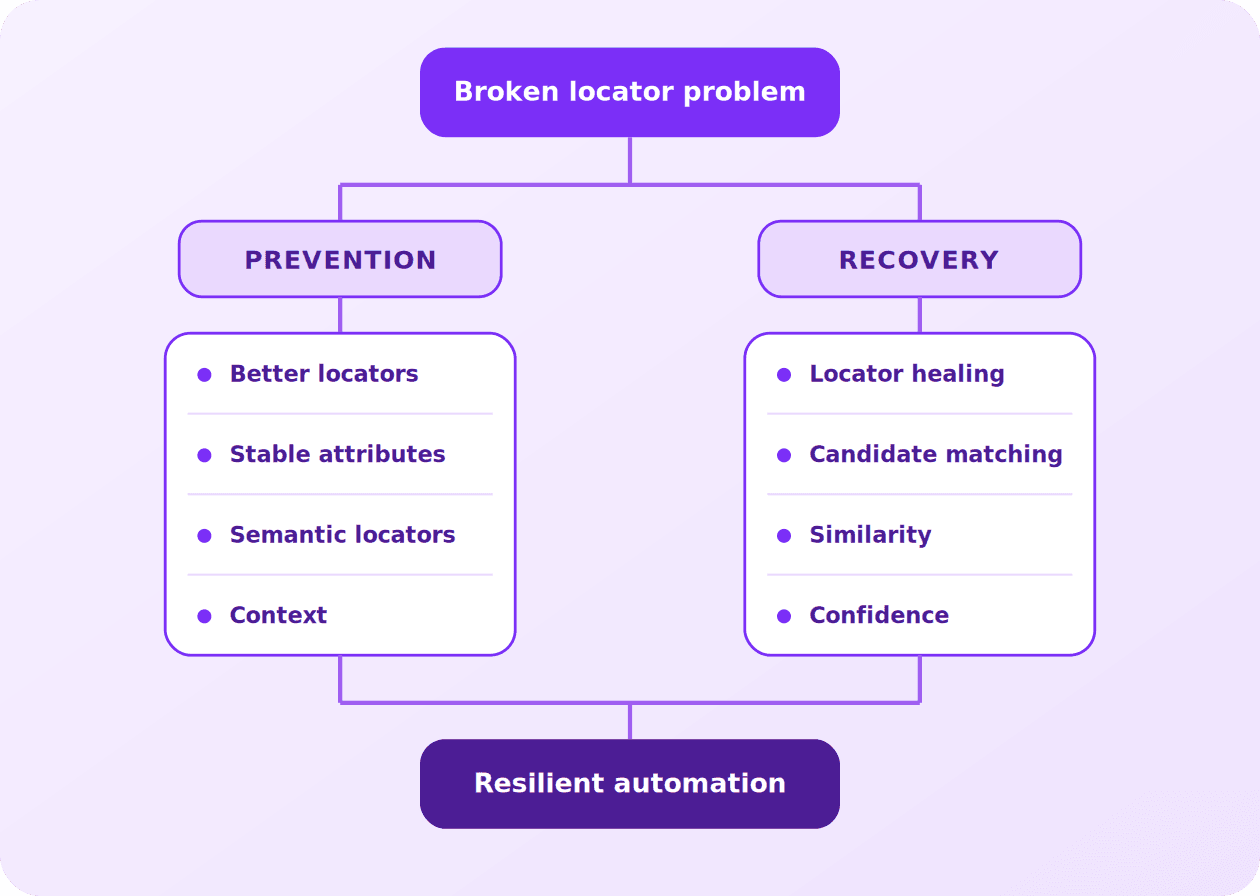
Prevention reduces how frequently locators break. Healing reduces the maintenance required when they do. Neither completely replaces the other.
The bigger problem isn't XPath
The deeper problem is the mismatch between what the test means and how the application happens to implement the UI.
The test means: Click Submit.
The application implements that button using IDs, classes, DOM hierarchy, components and attributes. Those implementation details can change without changing the intended interaction.
The more automation depends on those incidental details, the more maintenance it requires.
This leads to a broader goal for UI automation: identify elements based on what they represent, not only on how they happen to be implemented.
Where locator healing is going
Element identification can combine increasingly rich signals: traditional locators, semantic information, DOM context, visual characteristics, element relationships and application context.
Traditional locators become one signal among several. When that identification still fails, locator healing provides the recovery mechanism.
This creates a more resilient model of UI automation: Identify reliably → execute → detect change → recover when necessary.
Conclusion
Broken locators are an unavoidable consequence of testing applications that continuously evolve.
The answer isn't simply to write longer XPath expressions or to replace XPath with CSS.
The first step is to choose better locators: stable attributes, semantic locators, meaningful identifiers, appropriate relationships and minimal dependence on volatile DOM structure.
But even the best locator can eventually become invalid.
That's where locator healing becomes valuable.
Instead of immediately failing when an element cannot be found, the automation system can search for candidate elements, compare their characteristics, calculate confidence and recover the intended target when there is sufficient evidence.
The next evolution goes beyond traditional selectors altogether: can automation identify an element through its context, relationships, semantics and visual characteristics rather than depending entirely on its DOM implementation?
Better locators → resilient identification → locator healing → context-aware and visual identification.
The goal isn't to make every test pass. The goal is to make automated tests resilient to implementation change without becoming blind to genuine application failures.