
Most QA teams run on Selenium. It's free, works in every major browser and has an answer for almost any problem online.
But the suite keeps growing. A developer renames a button, half your tests turn red, and someone spends the day fixing locators instead of testing.
And that’s when scriptless test automation tool like ACCELQ comes up. It promises the same browser automation without the code, plus ready-made Salesforce testing. Let’s understand them in detail by comparing ACCELQ vs Selenium.
Key takeaways:
Selenium is free and works with every major browser and language, but your team builds and maintains the framework around it.
ACCELQ runs on Selenium underneath and hides the code behind plain-English steps, adding API, mobile, desktop and Salesforce testing in one platform.
ACCELQ isn’t a Selenium replacement. It runs on Selenium underneath and hides the code behind plain-English steps. So the real choice isn’t free vs paid. It’s whether your team wants to code its tests or skip the code entirely.
Selenium costs nothing to licence but plenty to maintain; ACCELQ costs a licence and setup time before your first test runs.
If your testers don’t code and you can’t afford a long setup, there’s a third option Sedstart is smarter alternative to ACCELQ and Selenium.
Short on time? Jump to the comparison table.
ACCELQ vs Selenium: a complete overview
Here's the simplest way to see it. ACCELQ and Selenium do the same job, automating tests, in different ways.
Selenium is an open-source library and your engineers performs the test. They write the scripts, build the framework around them and keep it all running.
ACCELQ is a commercial codeless platform does more of it. Your testers write steps in plain English, and the framework, integrations, execution and reports come built in.
The two are closely linked: ACCELQ's execution engine is powered by the Selenium runtime. So ACCELQ empowers Selenium, adding a ready-made platform on top of the same browser engine.
What is ACCELQ?
ACCELQ is an AI-powered codeless test automation platform. Tests are written as steps in natural language, and developers can add Java extensions when a scenario needs custom logic
One platform for many layers: web, API, mobile, desktop and mainframe testing
Autopilot: a set of AI agents that help discover, build and analyse tests
Self-healing: tests adapt when the UI changes, so fewer of them break
Salesforce testing: dedicated Salesforce automation, with a listing on Salesforce AppExchange
Flexible hosting: public cloud, private cloud or on premises
Before running your first test in ACCELQ, you'll need to map your app in the Application Universe, create reusable Actions, and install an agent if you're running tests locally. To understand how these pieces come together, here's a closer look at ACCELQ overview and how it works.
What is Selenium?
Selenium is a free, open-source suite for automating web browsers, and the most widely used test automation tool.
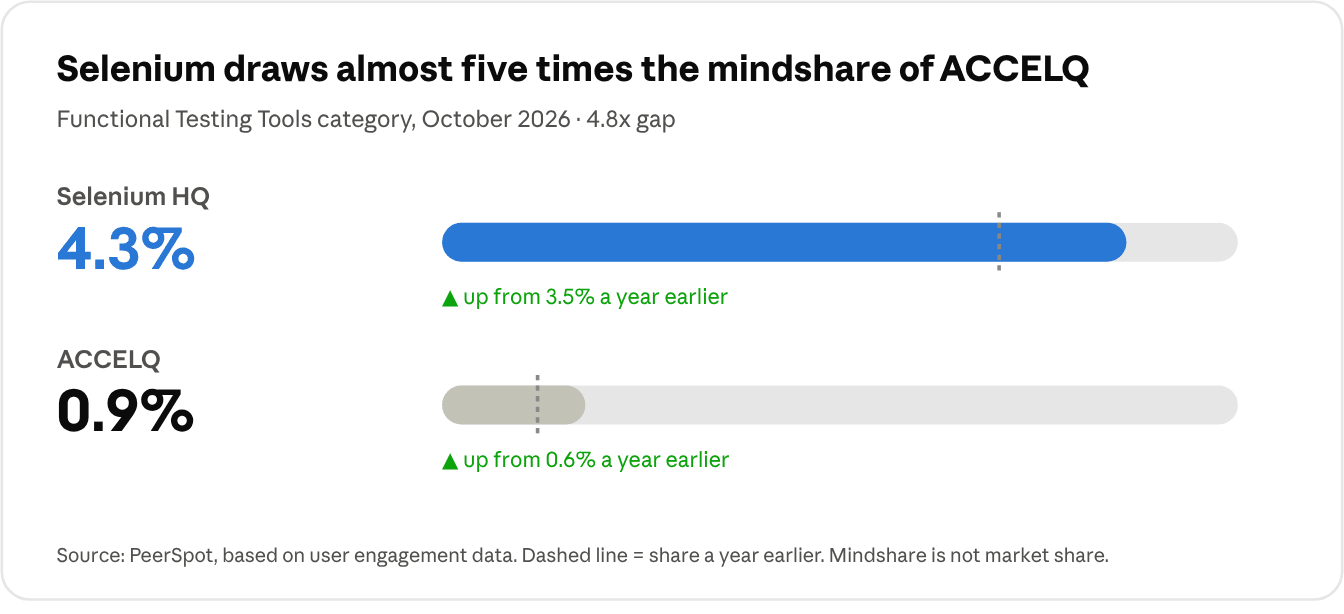
PeerSpot's October 2026 data for the Functional Testing Tools category show how far ahead it is. Based on PeerSpot user engagement, Selenium holds 4.3% mindshare, up from 3.5% a year earlier, while ACCELQ holds 0.9%, up from 0.6%.
Here's what you get:
Browser automation: WebDriver drives Chrome, Firefox, Edge and Safari from code
Any language: tests in Java, Python, C#, JavaScript or Ruby
Scale: Selenium Grid runs tests across many machines and browsers at once
Record and playback: Selenium IDE records simple tests in the browser
Open ecosystem: plugs into almost any framework or CI/CD pipeline
But the catch: Selenium is a library, not a platform. You build and maintain the framework, waits, test data and reports, and add Appium for mobile and other libraries for APIs.
ACCELQ and Selenium: where they overlap and where they differ
Overlap
ACCELQ runs on Selenium, so the two share a lot:
Automation: Both automate real browsers and support cross-browser testing
CI/CD pipeline: Both plug into CI/CD pipelines such as Jenkins and Azure DevOps
Reusability: Both let you reuse steps and run one test with different data
Extension: Both can be extended - Selenium with libraries, ACCELQ with Java extensions
Difference
Test creation: Selenium needs code (Java, Python, C# and more); ACCELQ uses plain-English steps
Setup: with Selenium you build the framework; with ACCELQ you map the app and build Actions first
When the UI changes: Selenium has no auto self-healing like ACCELQ. It is done through healenium which need to be setup manually and its long process.
Coverage: Selenium is browser-only (mobile needs Appium); ACCELQ covers web, API, mobile, desktop and mainframe
Salesforce: in Selenium you script dynamic Salesforce screens yourself; ACCELQ has dedicated Salesforce automation
Cost: Selenium is free but needs skilled engineers; ACCELQ is quote-based
So, both tools ask for something to get their job done: Selenium asks for code and constant upkeep, and ACCELQ asks for setup before your first test runs making team to look for smarter alternative to ACCELQ.
If your team wants neither, there's a third option.
Sedstart: A best alternative to Selenium and ACCELQ
Selenium gives you power but asks for code and upkeep. Whereas ACCELQ removes the code but asks for setup before your first test.
However, Sedstart is designed to remove this both friction: there's no code to write and no app model to build. A tester records a flow once, and it becomes a readable, reusable test that runs in the cloud.
Sedstart comes with ready-made support for Salesforce, SAP, IBM Maximo and Shopify, so the screens that are hardest to script become tests your manual testers can build. The same platform covers web, API and native Android and iOS apps on real devices, and it checks emails and 2FA codes inside the same test, a step that usually needs extra code in Selenium.
It also tackles the Monday-morning problem. Fallback locators give every element a backup way to be found, so a renamed button doesn't fail your run. And when something does break, you get an email straight away with failure analysis, instead of digging through logs.
Sherlock, Sedstart's AI, does the groundwork too.You can upload existing test cases for Sherlock to automate, or upload requirements documents (like a BRD or PRD) to automatically generate new test cases.
ACCELQ vs Selenium vs Sedstart: comparison table
Here's how all three compare side by side
| Features | ACCELQ | Selenium | Sedstart |
|---|---|---|---|
| License | Commercial | Free, open source (Apache 2.0) | Commercial |
| Platforms | Web, mobile, API, desktop, mainframe | Web browser only | Web, mobile, API; desktop (beta) |
| Native mobile automation | Yes | No, need Appium | Yes, on real Android and iOS devices |
| API testing | Built-in | No, needs a separate library | Built-in |
| Salesforce testing | Dedicated | No | Yes |
| Other enterprise app | SAP, Oracle, Workday and more | No | SAP, IBM Maximo, Shopify, OODO |
| Codeless test creation | Yes | No | Yes |
| Record and play | Yes | Basic, via Selenium IDE | Yes, built-in recorder |
| Self-healing test | Yes | No | Instead, we've Fallback locator that's predictable, easy-to-debug stability without the heavy overhead, flakiness, or costly AI dependencies of self-healing mechanisms. |
| AI | Yes, auto-pilot agent | No | Yes, Sherlock AI |
| Email and 2FA testing | Not stated | Need extra code | Yes, built-in |
| Cloud execution | Yes | No native support | Yes |
| Parallel execution | Yes | Via, Selenium grid | Yes |
| CI/CD integration | Built-in | Yes, needs coding | Yes, via GitHub Action and API |
| Reporting | Yes | No | Yes, with failure analysis emails |
| Set up effort | Medium | High | Low |
| Key feature and cons | Natural-language tests; Autopilot AI; self-healing; one platform for many layers; cloud or on-premises Cons: Setup before the first test; pricing not public; users want stronger reporting | Free; any major language; fully customisable; Grid for scale; large community Cons: Coding for every test; no self-healing; no built-in reporting, mobile or API testing. | No-code recorder; Sherlock AI test generation; email and 2FA checks; enterprise app support; real-device mobile Cons: Newer name with fewer public reviews |
Conclusion:
Selenium is still the foundation of test automation. It's free, endlessly flexible, and many teams have built their own frameworks on it to handle the edge cases unique to their product.
That foundation now powers a new layer of tools. ACCELQ is one of them: it runs on Selenium underneath and hides the code behind a codeless platform, in exchange for setting up an app model before you start.
Sedstart takes the idea a step further. Testers record a flow and it becomes a test, with no code and no model to build first. With it supports the enterprise package apps and the AI capabilities of turning existing test case into automation it supports across web, mobile and API in unified platform. So, you buy fewer tools and spend less time upskilling.
If you’re considering ACCELQ vs Selenium and your team wants neither, there’s a third option Book a demo with Sedstart today.